
Receipts
The Receipts section preserves and verifies payment, token, trade and NFT receipts.
Open it with F4.
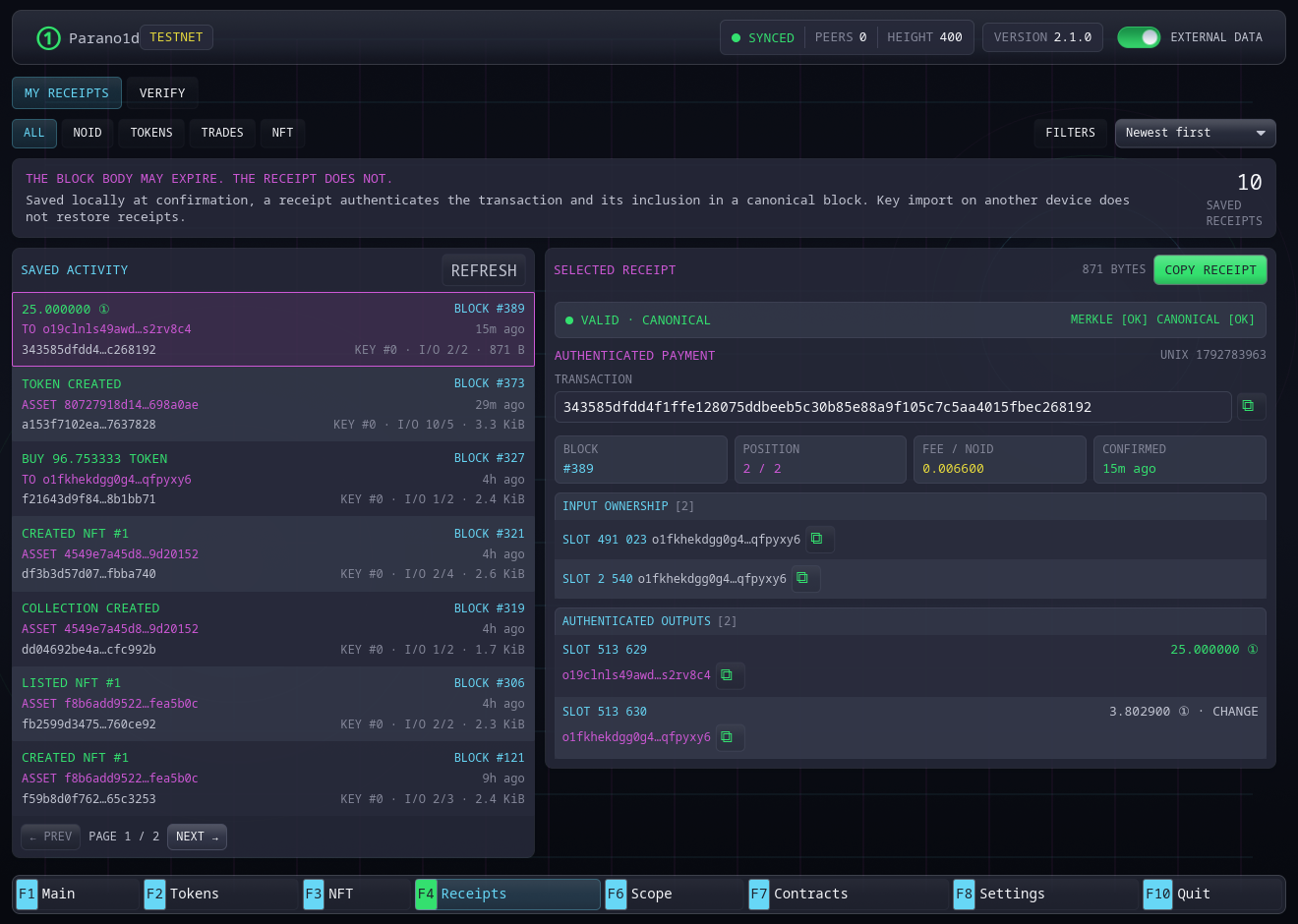
My receipts
My receipts lists saved payments to a distinct recipient and native asset operations. Choose All, NOID, Tokens, Trades or NFT. Newest entries appear first and the list is paginated. An exchange appears as one operation with its individual asset inputs and payouts.
Open Filters to narrow the history by:
- the complete 64-character asset or NFT collection ID;
- operation, such as a transfer, trade, burn/redemption or NFT purchase;
- dates in
YYYY-MM-DDformat, in UTC; Through includes that whole day; - verification status: Confirmed, Off chain or Header unavailable.
Confirmed means the receipt matches a retained canonical header. Off chain means its inclusion data is internally valid but differs from the current header. Header unavailable means the node has no canonical header at the claimed height. Opening a receipt shows its detailed verification.
Select Apply after editing filters. Clear removes the additional filters while keeping the selected family. The sort menu offers newest, oldest, asset and operation order. Filters and sorting cover the complete saved history before pagination. Asset sorting uses full identities; matching names or tickers do not combine assets.
Pending and unconfirmed submissions appear separately from saved receipts. Confirmed operations appear in the receipt library. Selecting a verification-status filter shows only the receipt library. If the chain or saved library changes during a query, refresh to read a consistent result.
Selecting an entry shows its authenticated summary:
- logical transaction ID;
- canonical block height and transaction position;
- input owner and input records;
- recipient and change outputs;
- amount and fee;
- inclusion and canonical verification status.
The receipt is saved only after confirmation while complete block data is available.
Local-only records
Receipts are stored in wallet.receipts on this device. Importing the master
secret on another computer restores addresses and live funds, but not receipt
history.
Back up the file or export individual receipt text if payment evidence matters. Loss of receipts does not affect spendable balance.
The store appends checksummed changes and periodically compacts them with an atomic snapshot instead of rewriting the entire collection on every change. Exported receipt text is independent of this local storage format. See wallet artifact storage for format and integrity checks.
Verify
The Verify tab accepts exported hexadecimal receipt text. Verification checks the transaction data and fixed-depth inclusion path, then compares the claimed transaction root with the permanent canonical header when a node is available.
The result distinguishes:
- a structurally valid inclusion proof;
- a receipt bound to the current canonical chain;
- invalid or malformed data.
Consolidation and derived addresses
Same-owner consolidation does not create a receipt because it is not evidence of payment to another owner.
A send to an inactive address derived by the same master secret does create a receipt. Consensus sees a distinct recipient owner and does not scan the wallet's possible address set.
For the underlying proof format, see Receipts and pruned history.
Contract calls
F4 handles ordinary payments, including deposits to a contract, and native token, trade and NFT receipts. Call receipts and shared contract files open in F7 Contracts → Open file. They include public terms and proof of a state transition. Import merges verified evidence into the local contract journal while preserving existing records. See contract receipts and recovery.