
Settings
Open Settings with F8.
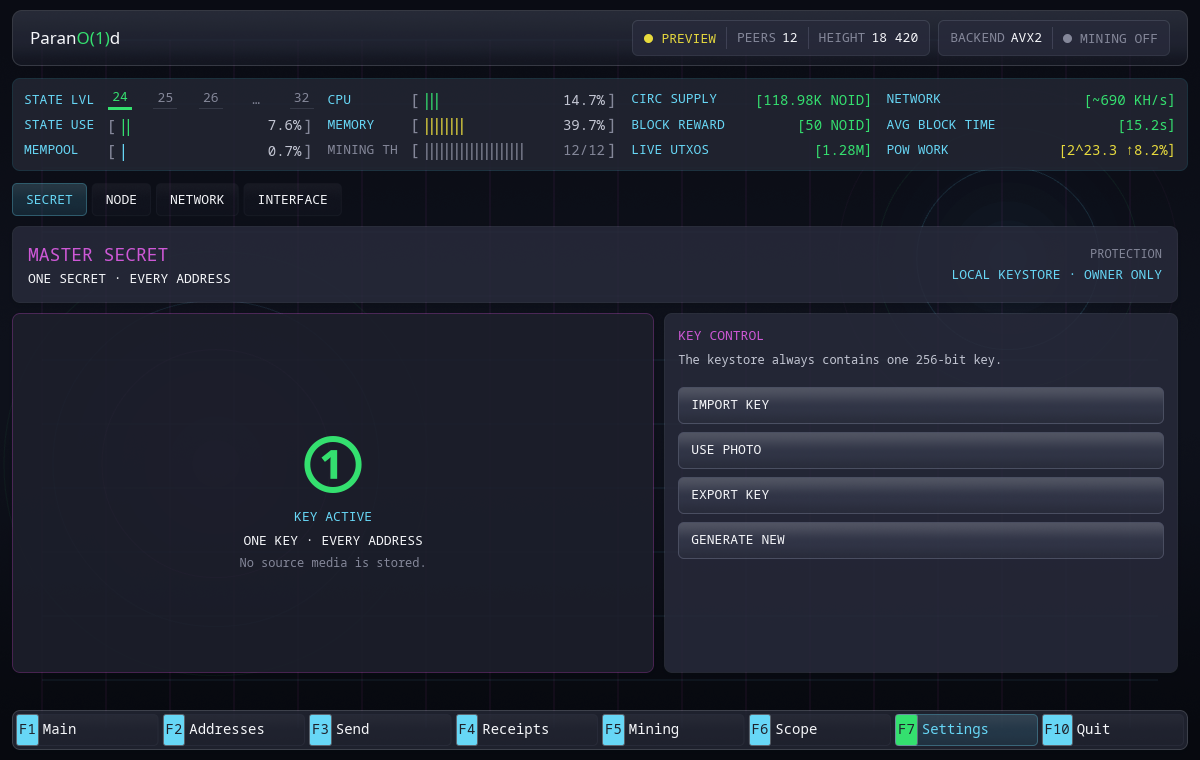
Secret
The Secret tab shows the active master-secret mode and exposes explicit maintenance actions:
- export the current 64-character master secret;
- import an existing secret;
- replace it from photo pixels;
- generate a new secret.
Replacement changes every derived address. Export the current secret first if it controls funds you intend to keep.
The secret field is not a normal application preference. Operations stop the private node, update the owner-only key file atomically and restart wallet state.
Node
Node settings control:
- data directory;
- log level;
- node restart when a restart-bound value changes.
The terminal-style log view shows a bounded tail of the real private-node log. Text can be selected and copied for diagnosis. Viewing it does not create a second persistent log store.
Changing the data directory points the application at a different database and wallet. Verify the target before applying.
Network
Network settings control:
- P2P listen address;
- additional seed endpoints.
The default P2P listener is 0.0.0.0:9600. Built-in DNS discovery works
without custom entries.
Do not expose the private RPC endpoint as a network setting. The GUI and node communicate locally.
Interface and external data
The header toggle External data controls token images and price history. It starts Off. Its tooltip is Load token images and price history. Current market State and live prices come from the local node in both modes.
Interface → Clear asset cache clears downloaded images, metadata and cached chart data. The image cache has a 64 MiB limit. Prepared uploads, saved receipts and wallet keys are kept. See asset media.